Automating Refuels
DonationStreamer.vyThe technical documentation for the DonationStreamer.vy contract can be found here. The contract is deployed at the same address on all supported chains:
 Polygon:
 FXSwap pools use refuels to subsidize rebalancing and keep liquidity tight around the current price. While refuels can be added manually via crvhub.com/refuel, the Donation Streamer lets you automate this process — depositing tokens once and having them streamed into the pool over a set schedule.
This is useful for projects that want to keep their FXSwap pools consistently refueled without manual intervention.
The Donation Streamer UI is available at curvefi.github.io/refuel-automation.
How It Works
- You choose which pool to refuel and how many tokens to deposit in total.
- You set a schedule: how often refuels should happen (e.g. once per day) and for how many periods.
- You set a small ETH bounty per period to incentivize someone to trigger each refuel.
- Your tokens and ETH bounties are locked in the contract.
- Each period, anyone can trigger the refuel and collect the bounty. An automated bot also runs every 8 hours, so refuels generally happen without any manual effort.
- Once all periods are complete, the stream is finished. You can also cancel at any time to recover remaining tokens and unspent bounties.
Supported Chains
The Donation Streamer is deployed at the same address on  Ethereum,
  Gnosis, and
  Base.
Base.
Creating a Refuel Stream
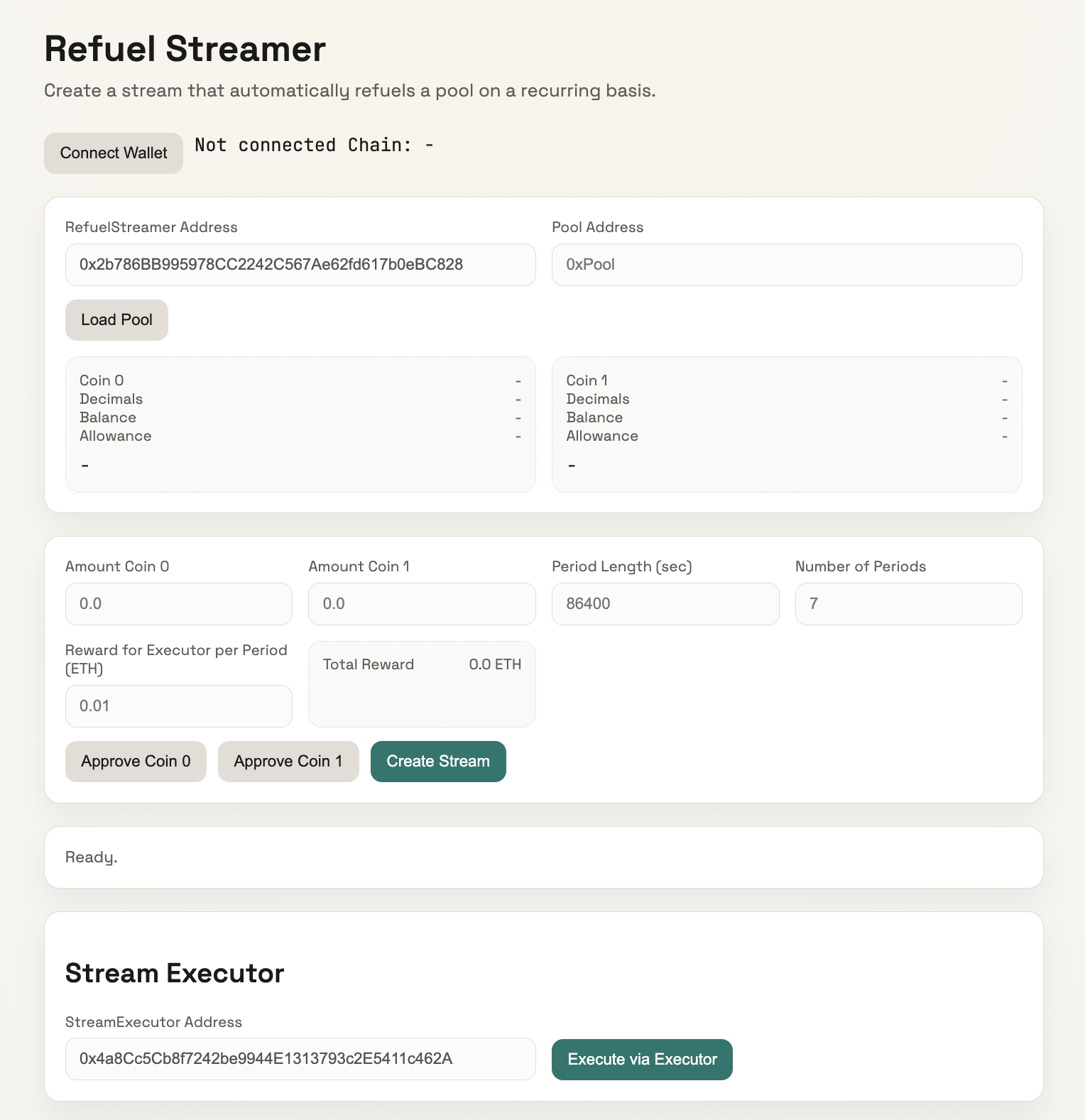
The UI has three sections: pool loading at the top, stream configuration in the middle, and the stream executor at the bottom.
Step 1: Connect Your Wallet
Click Connect Wallet in the top-right corner. Make sure your wallet is set to the correct chain. The UI will show your connected address and chain ID.
Step 2: Load the Pool
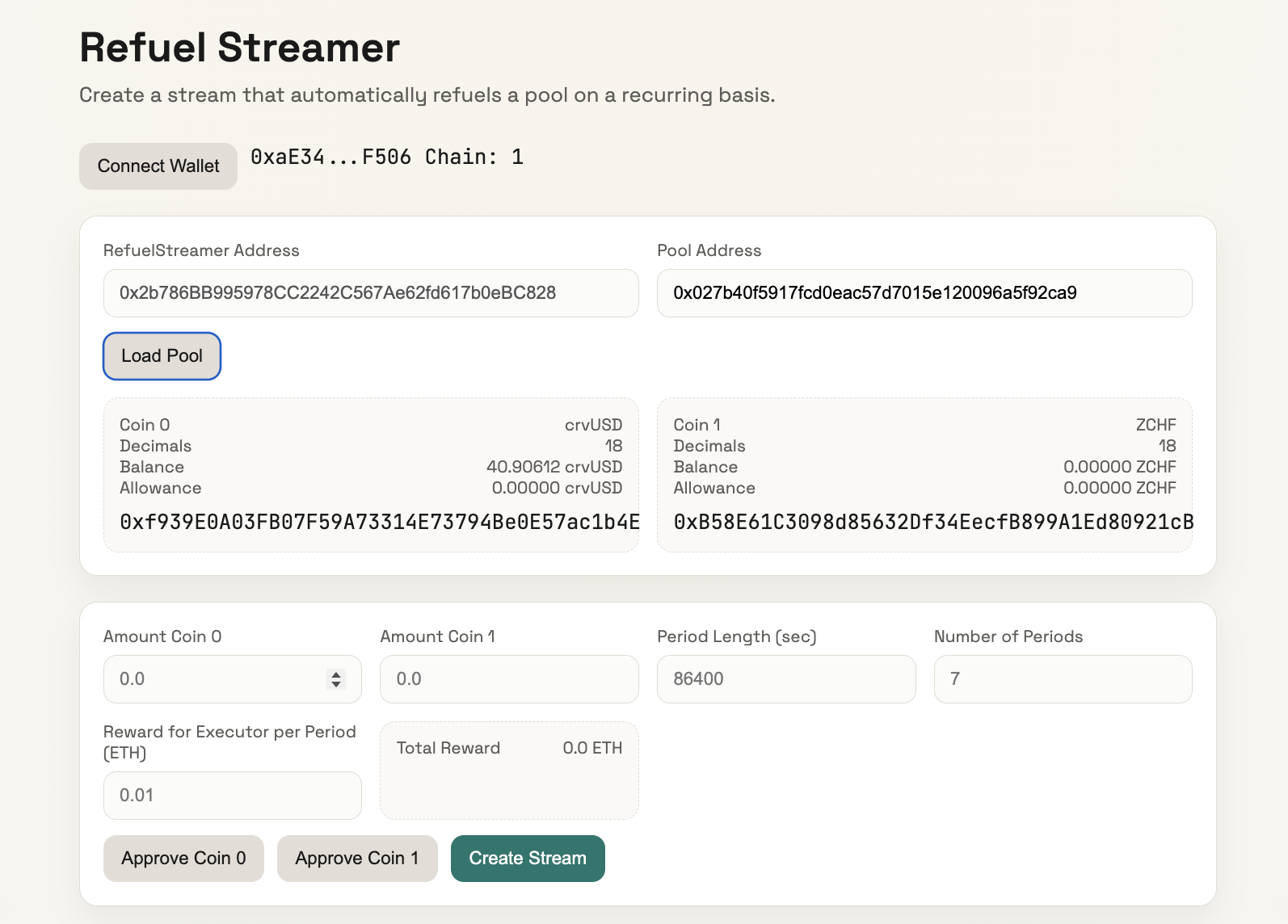
The DonationStreamer Address is pre-filled. Enter the Pool Address of the FXSwap pool you want to refuel and click Load Pool. The two info boxes below will populate with the pool's tokens (Coin 0 and Coin 1), showing each token's name, decimals, your balance, and your current allowance.
Step 3: Configure the Stream
Once the pool is loaded, fill in the fields in the middle section:
| Field | What it means |
|---|---|
| Amount Coin 0 | Total amount of the first token (shown under Coin 0 above) to refuel across all periods |
| Amount Coin 1 | Total amount of the second token (shown under Coin 1 above) to refuel across all periods |
| Period Length (sec) | How often a refuel should happen, in seconds (default 86400 = once per day) |
| Number of Periods | How many refuels to execute in total (default 7) |
| Reward per Period (ETH) | A small ETH bounty paid to whoever triggers each refuel (default 0.01) |
The Total Reward displayed next to these fields is calculated automatically as Reward per Period × Number of Periods. This ETH is sent with the transaction and held by the contract until claimed by executors.
You can refuel with just one of the two tokens — set the other amount to 0.
Example: The screenshot below shows a stream being configured to refuel a crvUSD/ZCHF pool with 30 crvUSD over 3 periods (once per day), with a bounty of 0.001 ETH per execution (0.003 ETH total).
Step 4: Approve and Create
- Click Approve Coin 0 and/or Approve Coin 1 to allow the contract to transfer your tokens. Only approve tokens where the amount is greater than zero. The status bar below will confirm the approval (e.g. "Approved crvUSD.").
- Click Create Stream. Your tokens and ETH bounties are locked in the contract, and the refuel schedule begins.
Monitoring Streams
Once a pool is loaded, you can view all active streams for that pool in the Pool Streams section. Enter a Lookback (count) to control how many recent streams to scan and click Load Pool Streams.
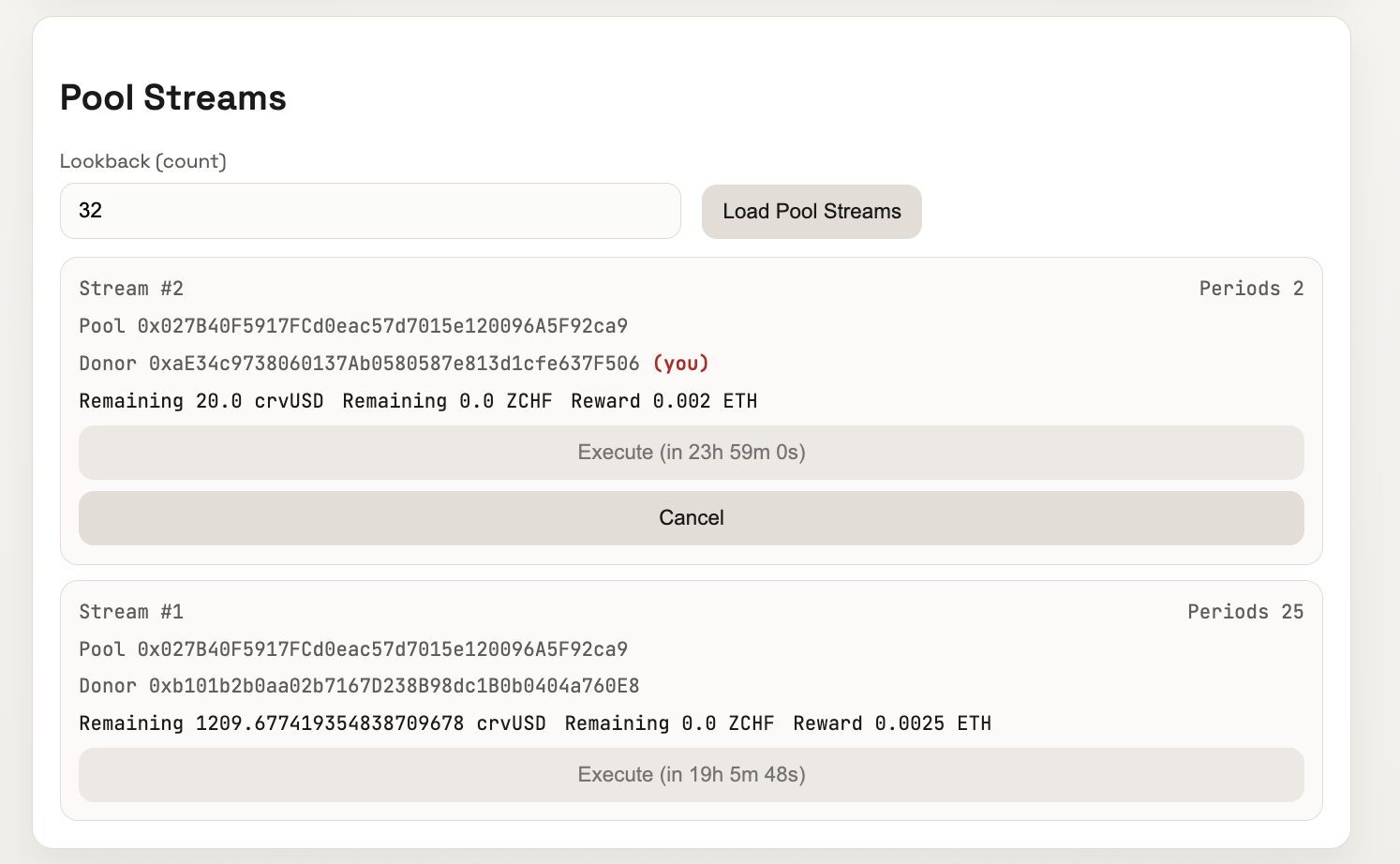
Each stream card shows:
- Stream ID and remaining periods (e.g. "Stream #2 — Periods 2")
- Pool and donor addresses (your own streams are marked with (you))
- Remaining token amounts and ETH reward still locked in the stream
- Time until next execution (e.g. "Execute (in 23h 59m 0s)")
Execution
An automated bot runs every 8 hours and executes all due refuel streams across all supported chains. In most cases, you don't need to do anything after creating a stream.
To manually trigger due refuels (or to earn the ETH bounties yourself), use the Stream Executor section at the bottom of the UI. The StreamExecutor Address is pre-filled — just click Execute via Executor to batch-execute all currently due streams and collect the bounties.
Tracking Refuel Consumption
Track refuel activity for any pool on the Refuel Monitor.
Select your pool to view detailed stats. For example: refuel.curvemonitor.com/ethereum/0x027B....
The dashboard shows Donation Shares (total refuel buffer) vs Unlocked Shares (how much has been consumed by rebalancing), as well as Daily Donations in USD over the last 7 days.
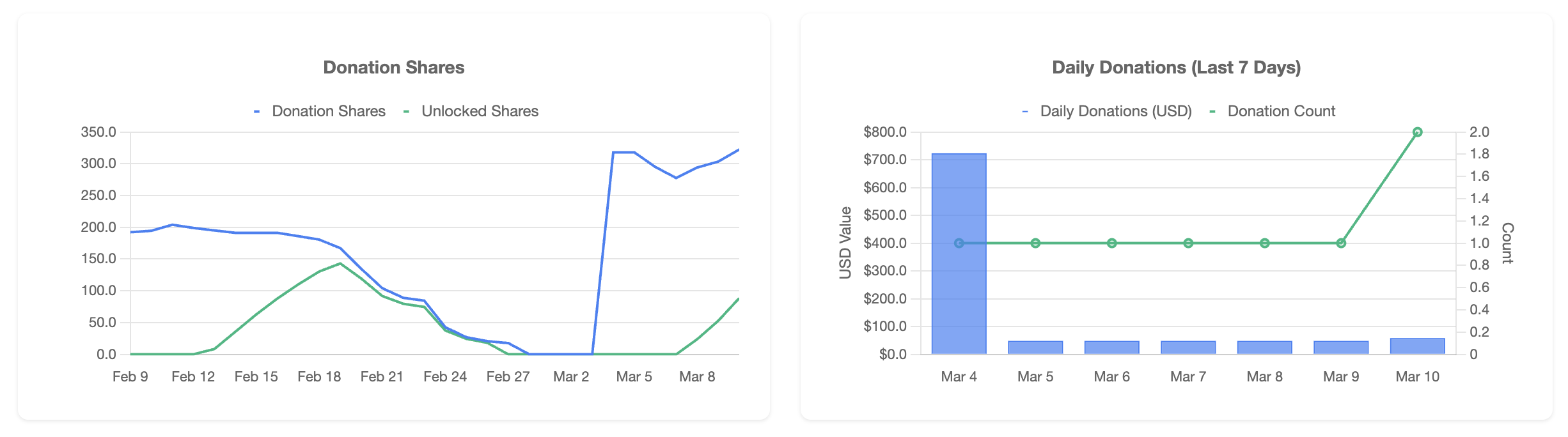
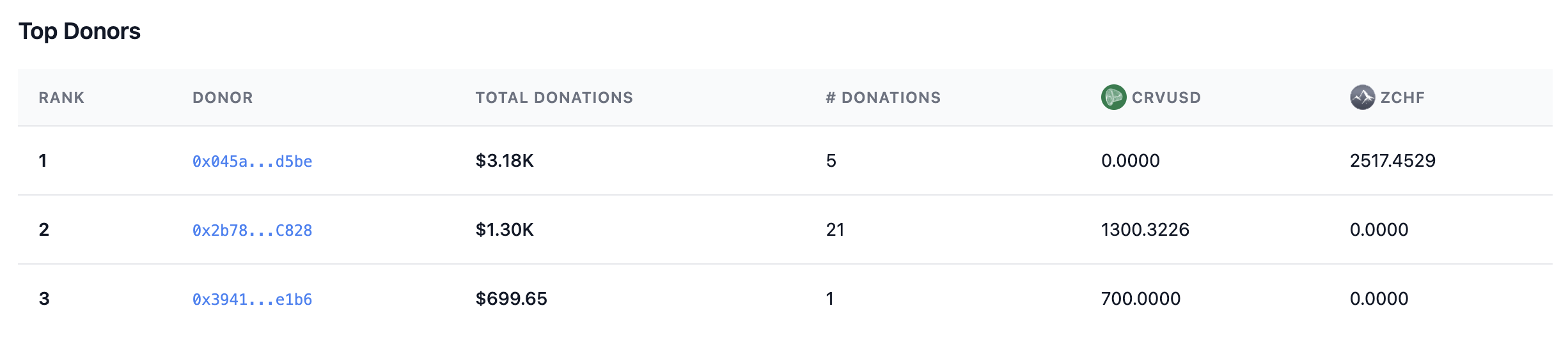
It also includes a Top Donors leaderboard showing each donor's total contribution in USD, number of donations, and token breakdown.
Cancelling a Stream
You can cancel your stream at any time to recover remaining tokens and unspent ETH bounties. In the Pool Streams section, find your stream (marked with (you)) and click the Cancel button.
Further Reading
- Understanding FXSwap — Refuels — how refuels work and what they cost
- DonationStreamer Contract Reference — technical documentation for the smart contract
- FXSwap Implementation — how donations are handled at the pool level